A command-line tool is a backend with no server in it. It uses the same runtime, the same build and the same packaging, so a tool written in Java starts in milliseconds as a single native executable, with no JVM to install beside it. The arguments are declared with annotations whose names follow picocli, the most widely used Java library for the job, so a picocli command usually needs nothing more than its imports changed.
The Initializr’s Command-line tool project type creates one, for Maven or for Gradle.
A command
A command is a class annotated @Command that implements Runnable, or
Callable<Integer> when it decides its own exit code. Each field annotated
@Option or @Parameters receives an argument:
import com.codename1.cli.CommandLine.Command;
import com.codename1.cli.CommandLine.Option;
import com.codename1.cli.CommandLine.Parameters;

import java.util.concurrent.Callable;

@Command(name = "greet", mixinStandardHelpOptions = true, version = "greet 1.0",
        description = "Prints a greeting.")
public class Greet implements Callable<Integer> {
    @Option(names = {"-c", "--count"}, description = "How many times.", defaultValue = "1")
    private int count;

    @Option(names = {"-l", "--loud"}, description = "Shout it.")
    private boolean loud;

    @Parameters(paramLabel = "<name>", description = "Who to greet.")
    private String name;

    @Override
    public Integer call() {
        String line = loud ? "HELLO, " + name + "!" : "Hello, " + name;
        for (int i = 0; i < count; i++) {
            System.out.println(line);
        }
        return 0;
    }
}
Run it on the JVM while you work on it, with the arguments in a property:
./mvnw cn1:backend -Dcn1.backend.args="--count 2 Ada"
./gradlew runBackend -Pcn1.backend.args="--count 2 Ada"
mixinStandardHelpOptions adds -h/--help and -V/--version, and the help
is written from the annotations:
Usage: greet [-hlV] [--count=<count>] <name>
Prints a greeting.
      <name>                  Who to greet.
  -c, --count=<count>         How many times. Default: 1
  -l, --loud                  Shout it.
  -h, --help                  Show this help message and exit.
  -V, --version               Print version information and exit.
Nothing is read by reflection. The build reads the annotations and generates
the code that fills each field and the application’s main, so a mistake in a
declaration is a build error rather than a surprise at run time: two options with
the same name, a field type there is no conversion for, positional indexes that
overlap, a command with nothing to run, or a static or final field.
Options and parameters
The command line is parsed the way picocli and the POSIX conventions parse it:
Short options cluster:
-lc 2is-l -c 2, and-c2is-c 2.A long option takes its value after a space or an equals sign:
--count 2,--count=2.--ends the options; every argument that follows is a positional parameter, even one that starts with a dash.@filereads arguments from a file, one or more per line.A boolean option is a flag. With
negatable = trueit also has a--no-form, and the help shows--[no-]color.
A field’s type decides how its value is converted: the primitives and their
wrappers, String, File, and any enum (an unknown value names the ones it
accepts). An array, List, Collection or Set collects every occurrence of an
option, and split = "," divides one value into several. Any other type needs a
converter, and anything the converter throws is reported as an invalid value:
@Command(name = "listen", description = "Opens a port range.")
public class Ports implements Runnable {
    /// A first and last port.
    public static class Range {
        final int first;
        final int last;

        Range(int first, int last) {
            this.first = first;
            this.last = last;
        }
    }

    /// Turns "8000-8010" into a range; anything it throws becomes a usage error.
    public static class RangeConverter implements ITypeConverter<Range> {
        @Override
        public Range convert(String value) {
            int dash = value.indexOf('-');
            if (dash < 0) {
                int port = Integer.parseInt(value);
                return new Range(port, port);
            }
            return new Range(Integer.parseInt(value.substring(0, dash)),
                    Integer.parseInt(value.substring(dash + 1)));
        }
    }

    @Option(names = "--ports", converter = RangeConverter.class, required = true,
            description = "A port, or a range such as 8000-8010.")
    Range ports;

    @Override
    public void run() {
        System.out.println("ports " + ports.first + " to " + ports.last);
    }
}
defaultValue applies when the argument is absent, and is converted like an
argument. It can name an environment variable, with a fallback after :-:
defaultValue = "${env:NOTES_FILE:-notes.txt}".
@Parameters takes the arguments that aren’t options. With index it takes
one position or a range ("0", "1.."); a collection field with no index takes
them all. arity sets how many values an option or parameter takes, as in
picocli: "1", "0..1", "2..".
Subcommands
A tool with several verbs, as in git commit, lists them in subcommands. Each
is a command of its own; @ParentCommand hands it the command above it, so
options given before the verb are shared, and @Spec hands it its own model:
@Command(name = "notes", mixinStandardHelpOptions = true, version = "notes 1.0",
        description = "Keeps notes in a file.",
        subcommands = {Notes.Add.class, Notes.Show.class})
public class Notes {
    @Option(names = {"-f", "--file"}, paramLabel = "<file>",
            description = "Where the notes live.", defaultValue = "${env:NOTES_FILE:-notes.txt}")
    String file;

    @Command(name = "add", description = "Adds a note.")
    public static class Add implements Runnable {
        @ParentCommand
        Notes parent;

        @Option(names = "--tag", split = ",", description = "Tags, comma separated.")
        List<String> tags;

        @Parameters(paramLabel = "<text>", description = "The words of the note.")
        List<String> words;

        @Override
        public void run() {
            System.out.println("adding to " + parent.file + ": " + String.join(" ", words));
        }
    }

    @Command(name = "show", aliases = "ls", description = "Lists the notes.")
    public static class Show implements Runnable {
        @Option(names = "--sort", description = "NEWEST or OLDEST.",
                defaultValue = "NEWEST")
        Order sort;

        @Spec
        CommandSpec spec;

        @Override
        public void run() {
            System.out.println(spec.qualifiedName() + " sorted " + sort);
        }
    }

    public enum Order { NEWEST, OLDEST }
}
notes -f work.txt add --tag home,urgent buy milk runs add; notes ls runs
show by its alias. A subcommand may come anywhere after the parent’s options,
and notes --help lists the subcommands.
A module may also declare several top-level commands without a group. They
become the subcommands of one command named after the application, which is the
cn1.cli.name setting in application.properties, or the project’s name.
Exit codes and output
The process exits with:
0 when the command finishes;
the value
call()returns, for aCallable<Integer>, orgetExitCode()for a command that implementsIExitCodeGenerator;1 when the command throws; the exception’s message is printed to standard error;
2 when the command line doesn’t parse; the error and the usage are printed to standard error.
Console output and prompts
The com.codename1.cli package has what a tool needs on a terminal: styled
text, tables, trees, progress bars, spinners and interactive questions.
Console.print(new Table("Service", "Status", "Replicas")
        .align(2, Table.Align.RIGHT)
        .addRow("api", Console.style("running", Console.Style.GREEN), 3)
        .addRow("worker", Console.style("degraded", Console.Style.YELLOW), 2)
        .render());

try (ProgressBar bar = new ProgressBar("upload", 40).unit("files")) {
    for (int i = 0; i < 40; i++) {
        upload(i);
        bar.step();
    }
}

Spinner spinner = Spinner.start("waiting for health checks");
waitForHealthy();
spinner.succeed("healthy");
Console answers questions about the terminal. width() and height() come
from COLUMNS and LINES when they’re set, then from the terminal itself.
isTerminal(), isErrorTerminal() and isInputTerminal() say which standard
streams are attached to one. colorEnabled() decides whether escape codes are
written: never under NO_COLOR, always under CLICOLOR_FORCE, never on a
dumb terminal or when standard output goes to a file or a pipe. colorLevel()
reports 16, 256 or true color from COLORTERM and TERM, and Ansi builds
styled text with any of them, converting a color the terminal can’t show to the
nearest one it can. Ansi also moves the cursor, erases lines, switches to the
alternate screen and writes hyperlinks.
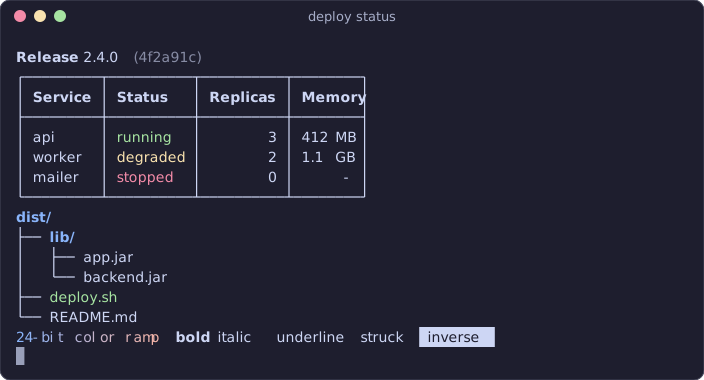
Table sizes its columns to the terminal and wraps cells that don’t fit;
Tree draws a hierarchy. Both measure text by what it looks like on screen, so
wide characters, emoji and styled text line up. Without a UTF-8 locale they
draw with ASCII.
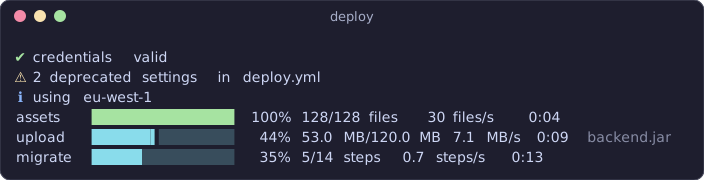
ProgressBar shows a count, a percentage, the rate and the time left, or a
moving bar when the total isn’t known; ProgressBar.track(items, "label") wraps
a loop. MultiProgress shows several bars at once, and its println writes a
log line above them. A Spinner shows that work is under way and ends with a
success, failure, warning or information line. They all redraw in place
on a terminal. When the output goes elsewhere they print a few plain lines
instead, so a log file or a build server shows what happened without escape
codes.
Prompt asks questions:
String env = Prompt.select("Environment", Arrays.asList("staging", "production"));
List<String> regions = Prompt.multiSelect("Regions", Arrays.asList("us-east", "eu-west", "ap-south"));
String token = Prompt.password("API token");
if (!Prompt.confirm("Deploy to " + env + "?", false)) {
    return 1;
}
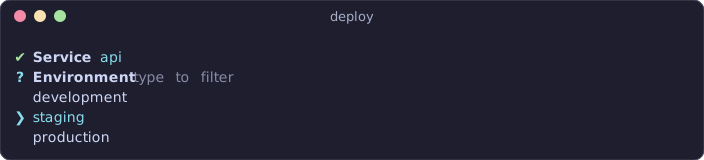
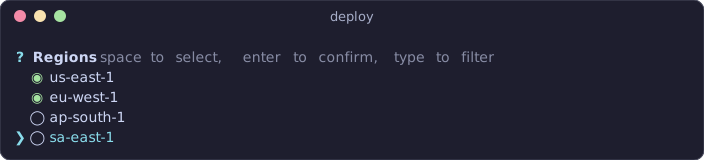
On a terminal the questions are interactive. Arrow keys move through a list,
typing filters it, space checks an item in a multiple choice, and a text answer
can be edited with the usual keys. Prompt.Text, Prompt.Select and
Prompt.MultiSelect add defaults, validation, masks and page sizes. When
standard input isn’t a terminal, each question reads a line instead: a number
or a label for a choice, a comma separated list for a multiple choice. That
keeps a tool scriptable with printf 'staging\n1,2\n' | tool. Ctrl-C at a
question throws Prompt.Cancelled, and the command exits with 130, as a shell
reports an interrupted program. The terminal is restored however the program
ends, including on Ctrl-C and kill.
A choice from a list, with the arrow on the second item:
A multiple choice, with two regions checked:
A masked password, an answered confirmation and a number that failed validation:

Testing
A command is an ordinary class. The build generates CliApplication, in the
package of your top-level command, and its commands() lists the models of every
top-level command. The generated class appears after the main sources compile, so
your tests can use it. A test runs the command line exactly as the binary would:
CommandLine.run("greet", CliApplication.commands(), new String[] {"--count", "2", "Ada"})
returns the exit code, here 0.
Building the executable
./mvnw cn1:backend-package, or ./gradlew backendPackage, translates the tool
to C and compiles it with clang into one executable for the machine it runs on,
Linux or macOS. Build on each platform you ship to; a continuous integration
matrix with one runner per platform is the usual way. The executable needs no
JVM and no other files.
The tool compiles against the backend’s class library, the subset of the JDK
that the native runtime provides: collections, strings, java.io files and
streams, java.time, and the backend’s own networking, database and
cryptography APIs. Packaging the tool reports any class outside that subset.
Command-line tools in Python
A tool written in Python uses argparse, as it would under CPython. Put the
modules in src/main/python of a command-line project, in place of the Java
command; main.py runs as __main__, with the command line in sys.argv:
import argparse
import sys


def main(argv=None):
    parser = argparse.ArgumentParser(description="Prints a greeting.")
    parser.add_argument("name", help="who to greet")
    parser.add_argument("-c", "--count", type=int, default=1, help="how many times")
    parser.add_argument("-l", "--loud", action="store_true", help="shout it")
    parser.add_argument("--version", action="version", version="%(prog)s 1.0")
    args = parser.parse_args(argv)
    greeting = "Hello, %s" % args.name
    for _ in range(args.count):
        print(greeting.upper() if args.loud else greeting)
    return 0


if __name__ == "__main__":
    sys.exit(main())
The build transpiles the program to Java and generates the entry point that
runs it, so runBackend, cn1:backend and the native executable all work as
they do for a Java tool. Usage, help and error messages read as CPython’s do,
with the project’s name as the program name, or cn1.cli.name from
application.properties. The process exits with the status CPython would
give it:
0 when the main module finishes;
the value passed to
sys.exit;1 when an exception escapes, after its traceback is printed to standard error;
2 when
argparserejects the command line, after the usage and the error are printed to standard error.
The Python is transpiled to Java 17, so the build runs on JDK 17 or newer;
the Maven project switches to that level by itself once src/main/python
exists. argparse covers the module as programs use it: positional and
optional arguments, every action and nargs, type, choices, defaults,
subcommands with add_subparsers, argument groups, mutually exclusive groups,
fromfile_prefix_chars and the help formatters. On a terminal that accepts
color, the usage line, program name and section headings are colored as in
CPython 3.14. parse_intermixed_args
isn’t supported.
The console API is available to Python as the cn1console module:
import cn1console as console


def main():
    console.print_table([["api", 3], ["worker", 2]],
                        headers=["Service", "Replicas"], align={1: "right"})
    for name in console.progress(["a.txt", "b.txt", "c.txt"], label="upload"):
        pass  # upload the file
    with console.spinner("waiting for health checks"):
        pass  # poll until healthy
    env = console.select("Environment", ["staging", "production"])
    regions = console.checkbox("Regions", ["us-east", "eu-west", "ap-south"])
    if console.confirm("Deploy to %s?" % env):
        console.echo("deploying to", ", ".join(regions), style="bold")
The standard modules read the same terminal: input(), getpass.getpass(),
os.get_terminal_size(), shutil.get_terminal_size() and
sys.stdout.isatty() behave as they do under CPython. A question cancelled with
Ctrl-C raises KeyboardInterrupt, which ends the program with status 130.
Commands in a backend
The annotations work in a server too, with no setting to turn them on. A backend
whose module also declares @Command classes gets a command line: its
administration tasks, such as a data import, a user reset or a report, sit next to
the server and share its code.
With no arguments the binary starts the server, exactly as it did before.
servestarts it as well, and--helplistsserveand every command.Any other command runs and exits, and the server never starts.
A backend with no commands still accepts --help, and ignores any other
argument, so existing deployments are unaffected.