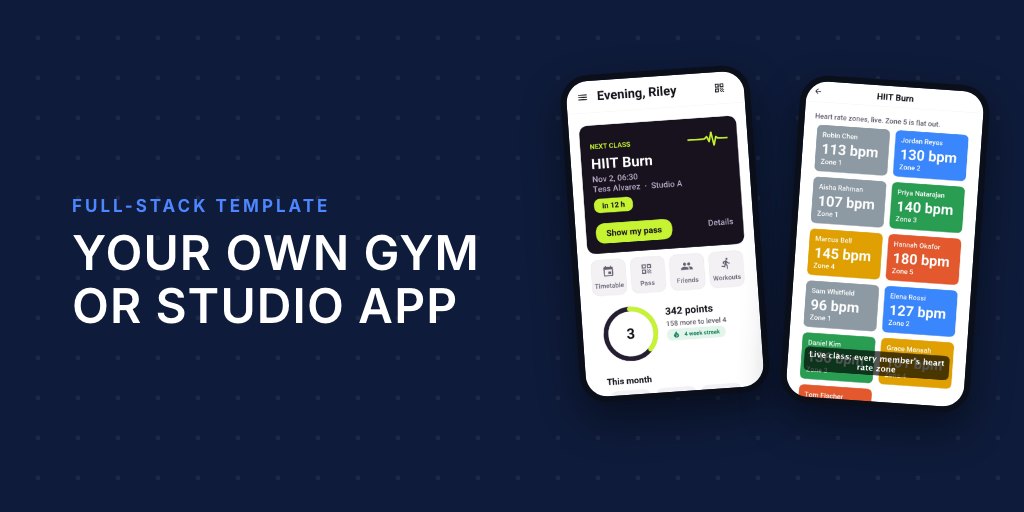
A spin class with a screen on the wall showing every rider’s heart rate zone is the kind of feature studios pay a lot for. It usually means a vendor’s hardware, a vendor’s app and a monthly fee per location. Underneath, it’s three hard integrations: reading a watch or a chest strap in real time, getting that reading off the phone fast enough to matter, and doing it on iOS and Android, which store health data in two completely different places.
Pulse is a studio template where that’s already done, in one Java project you own the source of. The member’s phone records the class, the trainer’s phone shows the room. You can generate it from the Initializr as Fitness studio, under your own name and package, and the source is MIT-0.
From the wrist to the wall
via HealthKit / Health Connect] --> S[Workout session
on the member's phone] H[Bluetooth chest strap
Heart Rate profile] --> S S -->|latest beat| B[(Pulse backend
HeartRates, in memory)] B -->|zone 1 to 5, live channel| T[Trainer's phone] S -->|saved workout| K[HealthKit / Health Connect] K -->|history| P[Visits, minutes, points]
When a member checks into a class, the app asks for permission once, then opens a workout session that collects heart rate. On iOS that’s a HealthKit workout, which also brings in a paired Apple Watch; on Android it’s Health Connect. It’s the same code on both:
Health.getInstance().getStore().requestAuthorization(
        HealthAccess.write(HealthDataType.WORKOUT),
        HealthAccess.read(HealthDataType.HEART_RATE),
        HealthAccess.write(HealthDataType.HEART_RATE)).onResult((asked, refused) -> {
    WorkoutConfiguration config = new WorkoutConfiguration()
            .setActivityType(WorkoutActivityType.CYCLING)
            .setTitle("Morning Spin")
            .addCollectedType(HealthDataType.HEART_RATE);
    Health.getInstance().getWorkouts().startSession(config).onResult((workout, failed) -> {
        if (workout != null) {
            workout.addListener(workoutListener);
            workout.start();
            pairStrap(workout);
        }
    });
});
Chest straps over Bluetooth
Plenty of members train with a chest strap instead of a watch, and the strap is more accurate anyway. Every strap on the market speaks the standard Bluetooth Heart Rate profile, so Pulse scans for that profile, connects to the first one it finds and feeds it into the same workout session, which means the strap’s beats end up in the member’s health history too:
HealthSensors sensors = Health.getInstance().getSensors();
sensors.startScan(new SensorScanSettings()
        .addProfile(HealthSensorProfile.HEART_RATE)
        .setTimeoutMillis(20000), new SensorDiscoveryListener() {
    public void sensorDiscovered(HealthSensor sensor) {
        SensorSessionOptions options = new SensorSessionOptions()
                .setAutoReconnect(true)
                .setWorkoutSession(workout);
        sensors.connect(sensor, HealthSensorProfile.HEART_RATE, options)
                .onResult((strap, failed) -> {
                    if (strap != null) {
                        strap.addListener(strapListener);
                    }
                });
    }

    public void scanFailed(HealthException error) {
    }
});
Auto reconnect matters more than it looks. A strap drops off for a second whenever someone wipes their chest, and you don’t want the trainer’s screen to lose them for the rest of the class.
A strap reports every beat. A watch, through the platform, reports running statistics instead, so Pulse reads whichever one it has:
public void sensorSample(SensorSession session, HealthSample sample) {
    if (sample instanceof QuantitySample
            && HealthDataType.HEART_RATE.equals(sample.getType())) {
        beat((int) Math.round(((QuantitySample) sample)
                .getValue(HealthUnit.COUNT_PER_MINUTE)));
    }
}

public void workoutStatisticsUpdated(WorkoutSession session, HealthDataType type) {
    HealthQuantity average = session.getStatistic(HealthDataType.HEART_RATE,
            AggregateMetric.AVERAGE);
    if (average != null) {
        beat((int) Math.round(average.getValue(HealthUnit.COUNT_PER_MINUTE)));
    }
}
Zones on the trainer’s screen
beat() sends the reading to the studio’s backend. The server keeps only the latest reading per member, in memory, and turns it into a zone: the reading’s share of 220 minus the member’s age, in fifths starting at 50%. Zone 1 is a warm-up, zone 5 is everything they’ve got. The trainer’s phone gets the zones over a live channel, so the room view updates as people push, and a trainer can see who’s coasting and who needs to back off.
Individual readings are never written to the database. A reading matters for a few seconds; the workout, which is kept, arrives whole when the class ends, and it’s also saved to the member’s own HealthKit or Health Connect store.
Reading history back
Past workouts, including ones recorded by other apps, feed the member’s progress screen. One query works on both platforms:
SampleQuery query = new SampleQuery().addType(HealthDataType.WORKOUT)
        .setTimeRange(HealthTimeRange.lastDays(14)).setLimit(30)
        .setSortDescending(true);
Health.getInstance().getStore().readSamples(query).onResult((samples, failed) -> {
    // turn workouts into visits, minutes and points
});
Workouts become points, streaks and badges, and friends can send kudos, which is the part that keeps people coming back in January.
Health data is regulated data
Heart rate is health data. In the EU it’s special-category data under GDPR, in the US it can fall under HIPAA depending on who holds it, and Apple and Google both have their own rules for apps that read HealthKit or Health Connect, including what you may store and what you must disclose. Pulse is built to stay on the right side of that by default: it asks only for the types it uses and keeps live readings out of the database. The implementor’s guide lists what you still have to do yourself before you ship, and you should read that part with whoever handles your privacy policy.
The rest of the studio
Health is the part this post is about, but Pulse is a whole studio app. The server decides which roles an account has, so the same install becomes a member app at home and a trainer app on the coach’s phone:
bookings, billing, points)] --- M[Member
book, pass, workouts, friends] B --- T[Trainer
live class, roster, leaderboard] B --- D[Front desk
tablet kiosk, check-in] B --- O[Owner
revenue, utilisation, campaigns]
Members book classes, join waitlists, add their kids to a household, and walk in with a door pass: a QR code that rotates, so an old screenshot stops working, or an NFC tap.
Owners get the desktop from the same codebase: takings, busy hours, under-filled classes, members who are about to churn, plans and pricing, campaigns, staff shifts and billing with a dunning ladder for failed cards.
Try it in two commands
The simulator has no watch or strap, so the dev backend plays demo heart rates into the live view. It runs in a dev profile with an in-memory database, text messages and pushes printed to the console and simulated card payments:
CN1_PROFILE=dev backend/server.sh run
mvn verify -Psimulator -DskipTests -Dcodename1.platform=javase
Log in with the demo accounts from the guide (owner@pulse.example, trainer@pulse.example, desk@pulse.example) to see each role.
The user’s guide walks through every screen, and the implementor’s guide explains billing, the door pass, health and what to change to make it your studio’s app.
Tomorrow: Real-Time Java: Control Loops the Garbage Collector Never Stops.